I Ran Out of Gas Mid-Sprint With Claude Code, So I Built It a Fuel Gauge
Originally published on Medium
Can't see your Claude Code usage until you hit the wall? I built a macOS menu bar app that tracks it live — no private APIs, just the official statusLine.
Ever had your card declined mid-checkout with zero warning? No low-balance alert, no heads-up — just a flat "insufficient funds" the moment it matters most.
That's basically what it feels like to hit a rate limit in Claude Code. You're mid-flow, cranking through a refactor, and suddenly you're told your 5-hour usage window is maxed out. No dashboard, no gauge, just a wall you slam into.
The problem isn't the limit, it's the invisibility
Claude Code has a /usage command that shows your consumption, but you have to remember to run it. Nobody stops mid-flow to check a progress bar. So you end up hitting the ceiling with zero warning — and it's actually two ceilings to track, not one: a rolling 5-hour window and a 7-day weekly window for Pro/Max subscriptions.
Here's the part that actually makes this hard: Anthropic doesn't publish an API for subscription usage. The Console API's usage and rate-limit endpoints only cover pay-as-you-go API key billing — a completely different thing from Pro/Max subscription quota. If you want to build a live dashboard, there's officially no door in.
The fix, in one sentence: turn usage into a battery indicator
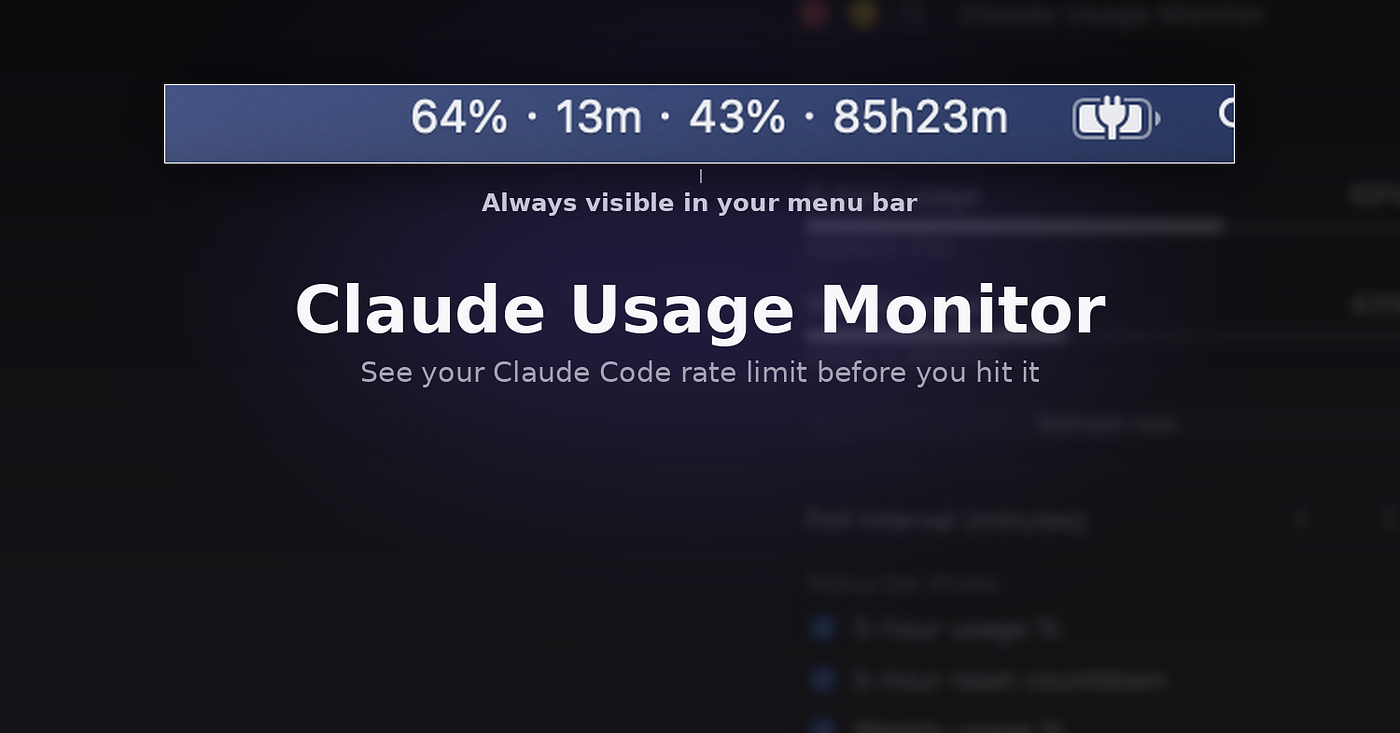
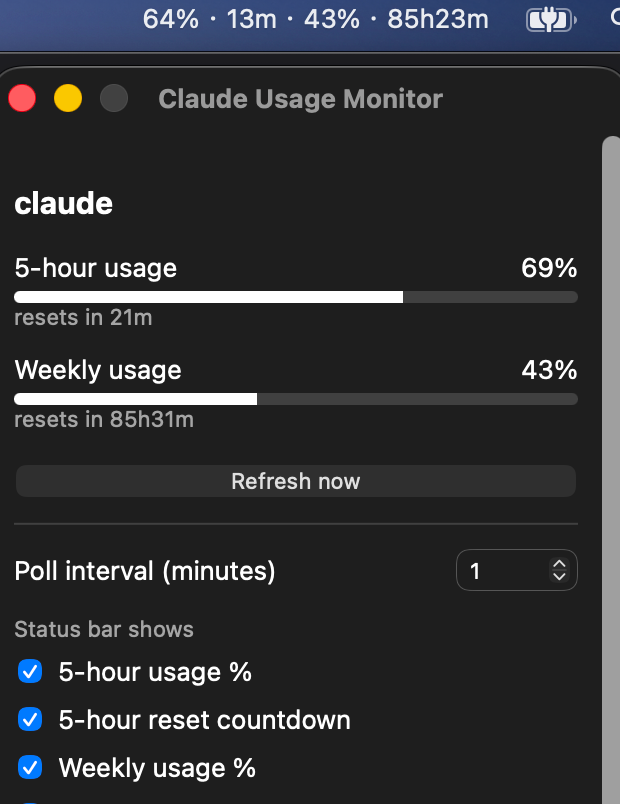
So I built Claude Usage Monitor — a macOS menu bar app that turns Claude Code's 5-hour and weekly usage into a live dashboard. Click the tray icon, see the progress bars and reset countdowns, as intuitive as checking your phone's battery.
Quick Start
Installation is three steps:
# 1. Download the latest .dmg from Releases
# https://github.com/jasonChen0604/claude-usage-monitor/releases

# 2. Open the dmg, drag the app into Applications

# 3. First launch only: the app isn't signed with an Apple Developer ID,
#    so a plain double-click gets blocked by Gatekeeper. Right-click instead.
# In Applications, right-click (or Control-click) the app → Open
On first run, the app offers to configure Claude Code's statusLine for you — just accept it. If you'd rather do it manually, add this to ~/.claude/settings.json:
{
  "statusLine": {
    "type": "command",
    "command": "node /Applications/Claude Usage Monitor.app/Contents/Resources/scripts/claude-statusline-collector.cjs"
  }
}
Then send Claude Code at least one message (so it produces one API response), and the tray numbers will update on the next poll — every minute by default.
Three things I thought were bugs, but were actually design constraints
Trap one: the temptation of the private endpoint
I'll admit it, I was tempted to take a shortcut. Anthropic has an undocumented endpoint, GET /api/oauth/usage, that returns live usage data directly. Accurate, instant, and looked like the obvious path.
Then I actually read Claude Code's legal and compliance docs. OAuth tokens are explicitly restricted to "ordinary use of Claude Code and other native Anthropic applications," and third-party tools routing requests through user credentials to this endpoint have already been blocked server-side before. That meant even if it worked today, it could get cut off tomorrow — and it's a line explicitly drawn in writing. I dropped it entirely and went with the officially supported statusLine mechanism instead. The trade-off: the data isn't a live query, it's a snapshot of "whatever Claude Code last rendered."
Trap two: numbers jumping around with multiple sessions open
While developing, I usually have several terminal tabs running Claude Code at once. At some point I noticed the tray percentage wasn't climbing monotonically — it'd jump from 42% down to 18%, then back up, seemingly at random.
My first instinct was that my polling logic was broken. I went back through popover.js, checked renderWindow and formatCountdown line by line — the logic was fine. The actual issue wasn't in rendering at all: each terminal session independently renders its own statusLine, and every session writes to the same shared claude.json snapshot file. Whichever session's statusLine rendered most recently wins and overwrites the rest. It's not a bug in my code — it's an inherent limitation of using a per-render callback as the single source of truth. There's no fix for it without touching the prohibited private endpoint, so I documented it plainly instead of pretending it doesn't happen.
Trap three: the app that claimed to be "damaged"
After building the installer, I ran it myself for the first time and macOS immediately threw "Apple could not verify the developer." Try again and it upgraded to "the file is damaged." I assumed something was broken in my tauri build signing or packaging step and rebuilt it two or three times — same result every time.
Turns out this is just standard macOS treatment for any unsigned app, completely unrelated to the packaging pipeline. The fix is a right-click "Open" instead of double-clicking, or going into System Settings → Privacy & Security and clicking "Open Anyway." A one-time step. I folded that warning directly into the README's install instructions so nobody else has to rediscover it the hard way.
Under the hood
+------------------------+------------------------------------------------+--------------------------------------------+
| Component              | What it does                                   | Effect                                      |
+------------------------+------------------------------------------------+--------------------------------------------+
| statusLine collector   | Registered as Claude Code's                    | Never touches any private API -- uses the   |
| script                 | statusLine.command, reads JSON from stdin,     | only officially supported channel           |
|                        | extracts rate_limits, writes a standardized    |                                              |
|                        | UsageSnapshot file                             |                                              |
+------------------------+------------------------------------------------+--------------------------------------------+
| UsageSnapshot schema   | Shared format: provider name + a windows array | Adding a new provider later just means      |
|                        | (5h/7d, each with percentage and reset time),  | writing one collector script matching the   |
|                        | written to a common snapshots directory        | schema -- app core doesn't change           |
+------------------------+------------------------------------------------+--------------------------------------------+
| Tauri tray app         | Rust backend polls the snapshot directory on a | Users can independently choose percentage   |
|                        | timer, reads every provider's json file,       | vs. countdown display for each window       |
|                        | renders it to the menu bar and popover         |                                              |
+------------------------+------------------------------------------------+--------------------------------------------+
| App Group mirroring    | Copies each snapshot into a shared macOS App   | WidgetKit widget can read the same data     |
|                        | Group container                                | independently, without reimplementing the   |
|                        |                                                 | data source                                 |
+------------------------+------------------------------------------------+--------------------------------------------+
The whole design boils down to one idea: cleanly separate "how to get the data" from "how to display it" using a provider-agnostic shared format. Adding a new subscription source later only ever touches one standalone collector script.
What to know before you rely on it
- The numbers aren't live — they're a snapshot from the last time Claude Code rendered its status line. If you haven't used Claude Code in a while, expect stale numbers until you send another message.
- Small discrepancies vs. the
/usagecommand are expected, since the two capture data at slightly different moments. That's inherent to the design, not a bug. - Running multiple Claude Code sessions at once will make the displayed percentage jump around instead of climbing steadily (see trap two above) — a known, unfixable limitation.
- You need to send at least one message first — the
rate_limitsfield only shows up after Claude Code gets its first API response. A fresh install shows nothing until then. - If you already have a custom statusLine script, installing this one directly will overwrite it. Check
docs/setup-statusline.mdfor how to chain both scripts together, or edit the collector script to build your own output string.
Wrapping up
Claude Usage Monitor solves a small problem — letting you glance at the fuel gauge before you drive, instead of finding out you're empty when the engine cuts out. But it's a small problem almost every heavy Claude Code user has run into.
The project is MIT-licensed and fully open source: a Rust/Tauri core plus a Node.js collector script that's maybe a few dozen lines long, no backdoors, no private endpoints touched. If you've been getting blindsided by rate limits too, give it a try — and if it's useful, a star on GitHub is the most direct way to say so.
Have you been caught off guard by a rate limit mid-flow before? And which provider should get support next — Copilot or Codex? Let me know in the comments.
- GitHub: https://github.com/jasonChen0604/claude-usage-monitor
- Releases (download the .dmg): https://github.com/jasonChen0604/claude-usage-monitor/releases